The history of component association transactions can be accessed using the Umler Transaction Log task. To view historical component associations:
1. Log onto Umler as described in Logging In. The Umler Welcome page is displayed (Exhibit 8).
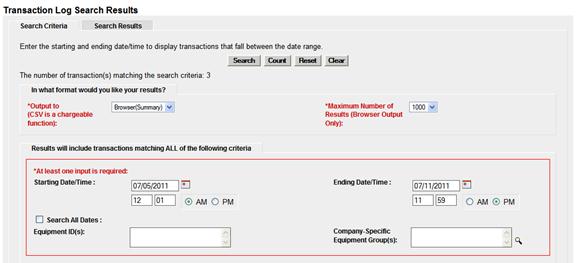
2. Select Query>Transaction Log. The Transaction Log Search panel is displayed (Exhibit 81).
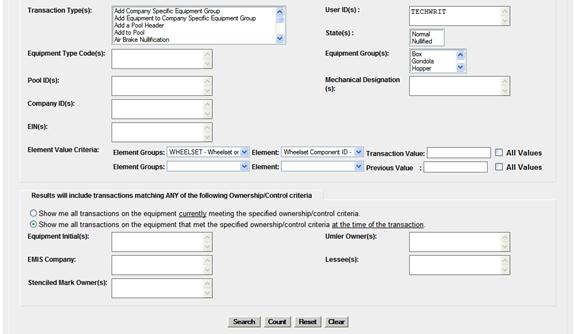
Exhibit 81. Transaction Log Search (with Element Value Criteria for Wheelset Components)
|
|
3. Set general search criteria as described in the Umler User Guide.
4. To confine the results to component transactions, set the Element Group and Element fields to one of the following:
"BOLSTER" and "Bolster Component ID - B351"
"COUPLER" and "Coupler Component ID - B353"
"SIDEFRAME" and "Sideframe Component ID - B352"
"WHEELSET" and "Wheelset Component ID - B350"
In Exhibit 81, criteria used included these fields, for a one-week period, for a user ID = TECHWRIT. The results are shown in Exhibit 82.
Exhibit 82. Transaction Log Search Results
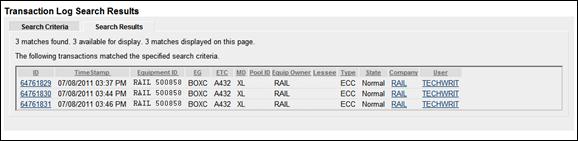
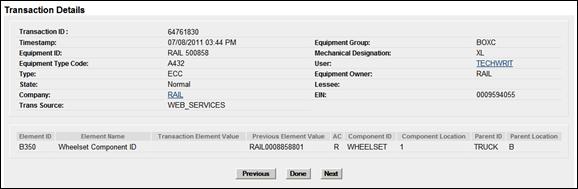
5. To view the details of the transaction, select the ID link at the left. The first transaction is shown in Exhibit 83.
Exhibit 83. Transaction Details (for component association)
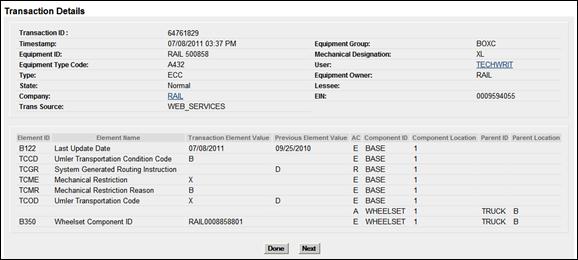
Exhibit 83 shows a component ID with a null previous element value, so this transaction represents an association event.
6. Select Done to return to the search results, or select Next to view the next component transaction details (Exhibit 84).
Exhibit 84. Transaction Details (for component nullification transaction)
In Exhibit 84, the Wheelset Component ID value is null, with a previous value of RAIL0008858801, which indicates that the association has been nullified.
7. Select Done to return to the search results or select another menu item.

Legal Notices | Terms of Service | Umler Reference Materials
© 2013 Railinc Corp. All rights reserved.