Here is how to view and complete partial SCRS records.
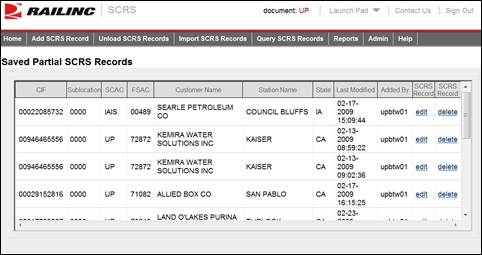
1. From the application menu, select Add SCRS Record > View Partial Records. The Saved Partial SCRS Records page is displayed.
Exhibit 14. Saved Partial SCRS Records
2. Perform one of the following actions:
a. Select the edit link next to a record that you want to resume working on. The Add SCRS Record screen is displayed (see Exhibit 4. Add SCRS Record (SCRS Details)) allowing you to resume work on it.
b. Select the delete link next to a record that you want to delete. A confirmation box is displayed. Select OK to confirm your decision to delete that record; select Cancel to cancel the deletion.